|
|
|
|
|
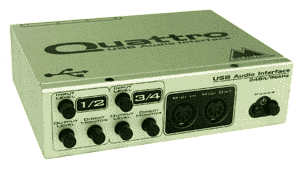
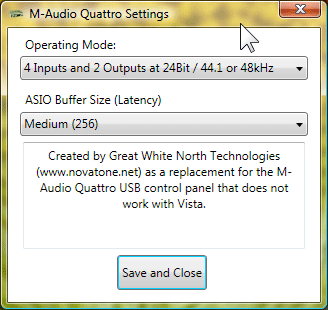
| M-Audio Quattro USB Control panel replacement for Vista and Windows 7 This program is intended to replace the control panel applet provided with the M-Audio Quattro USB 4 input USB audio interface. The control panel supplied by M-Audio does not work on Windows Vista or Windows 7 although the drivers do. Note: Unfortunately, there are no 64 bit drivers for any version of Windows that work with the Quattro so if you have a 64 bit version of Windows you are out of luck. If you have a 64 bit version of Windows, you have two possibilities for getting the Quattro to work. 1 - Reinstall Windows using the 32 bit version, either replacing the existing version or in dual boot. 2 - If you have Windows 7 Pro you have the option of installing 'XP Mode' and running the Quattro and your recording software in the Virtualized copy of Windows XP. This program will allow you to:
The program works by locating the Quattro driver's ASIO settings in the registry, reading the current settings and allowing you to select and save new settings. The settings that have to be changed are located in a registry location that requires administrative privileges to save changes so if you have User Account Control (UAC) enabled (the normal setting on Vista and Windows 7) you will see a UAC security prompt both during installation and each time you run the program. You will need to disconnect and then reconnect the USB cable from the Quattro to have the settings change take effect. Important Driver Installation Information: The Quattro requires the M-Audio provided drivers to be installed. The first time you plug the Quattro into a USB port a generic Microsoft provided driver will be installed. Check the driver installation page for information on how to verify and update your drivers. Note: This works on the systems I have used for testing, but let me know if you have any problems with it. (email address below) |
|
If your system does not have all of the required system files (like the .NET framework 3.5 runtime) they will be downloaded automatically during the installation. |
|
System Requirements
Windows Vista or Windows 7
.NET Framework 3.5
Contact: Rick Macmurchie
E-mail: rmac@novatone.net
Phone: 1(250)658-6319
1000 Fenn Avenue, Victoria B.C. Canada V8Y 1P3